Valence — Kids Mode Built for children, not bolted on
A private first AI for your kids — runs on your machine, nothing leaves it

AI your kids can use. And you can trust.

Most “kid-safe AI” is an adult chatbot with a filter bolted on. Kids Mode is built for children from the ground up — it runs entirely on your own computer, keeps its safety rules in the model’s core instructions, is honest that it’s a tool and not a friend, and shows you everything.

On-device only — no cloud Ages 3–17, five tiers Nothing hidden from parents
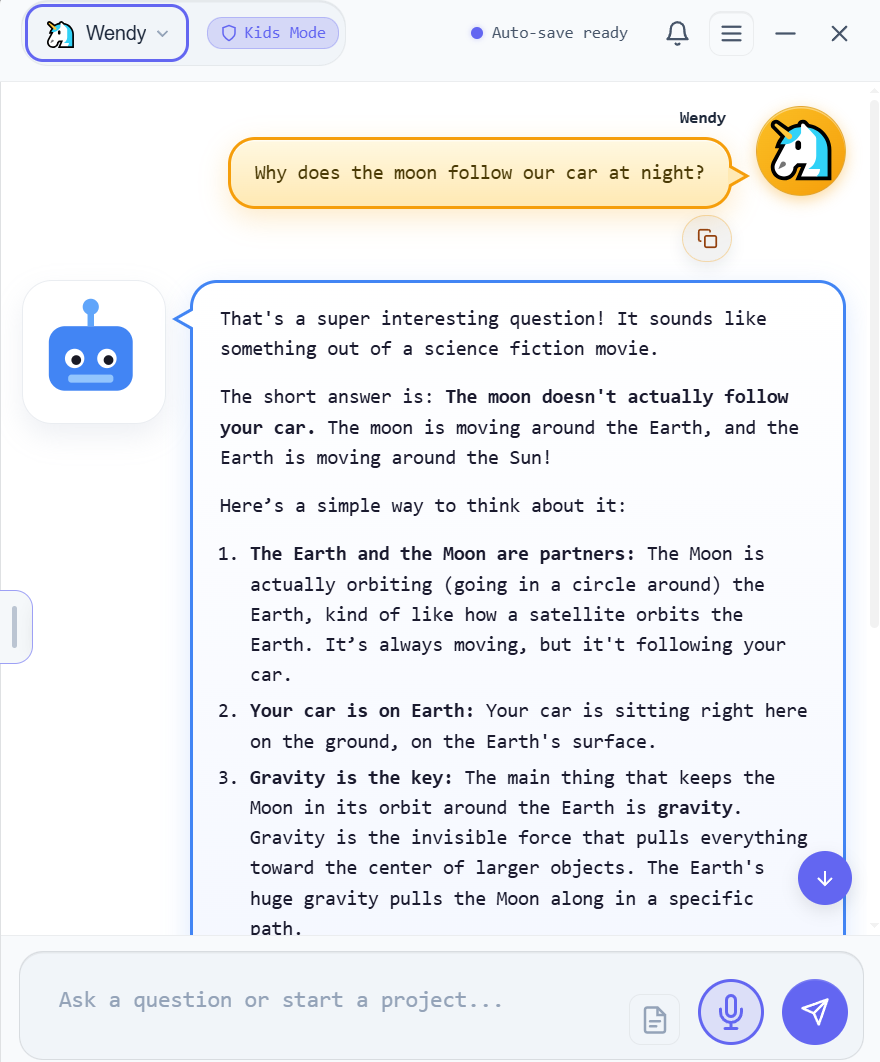
valence kids mode — Botly answering a 10-year-old
Valence Kids Mode: a child profile asking why the moon follows the car, answered simply and warmly by Botly, the Kids Mode guide.
ScreenshotBotly answering a child’s question, simply and warmly

Fig. 1 — A real Kids Mode conversation. The guide is Botly; the profile name (here “Wendy”) is whatever you call your child.

01Why this needed to exist

Handing a kid an adult AI is a gamble.

My 10-year-old asked to talk to a chatbot — to ask it a question, like it was a person. That stopped me cold. What’s out there for children is bleak: grown-up AI in impressionable young hands. Four things worried me most.

i.

An adult tool, lightly filtered

The same model adults use, with a content filter on top — one kids quickly learn to talk around.

ii.

Their words, on a server

Whatever a child types is sent to someone else’s cloud, kept, and often used to train the next model.

iii.

A bot that plays “friend”

It says “I feel,” “I missed you,” “I’m your friend” — and a young child believes it.

iv.

No window for parents

You can’t see what was asked, how it answered, or how long they were on it.

So I built the place I’d let my own kids use — safer, private, and fully observable.

02How Kids Mode works

Four promises, built into the app.

Not a setting you toggle and hope. Each of these is how the app is built — the safety is structural, and the visibility is total.

Pillar 1 — Private by design

It runs on your machine. Nothing leaves it.

Kids profiles can only use the on-device model — the cloud picker is removed, with no override. Your child’s words are answered by your own computer, so nothing they type is ever sent anywhere. When nothing is collected or transmitted, the data-collection worries that hang over cloud AI for kids simply don’t apply.

  • On-device model only — no frontier or cloud models, no exceptions
  • Conversations are plain files on your disk, under your control
  • Review or delete any of it, anytime — it never leaves the machine
kids profile — locked to the local model
Creating a Kids profile in Valence: choosing the child's age bracket, with the model locked to the on-device local model.
Screenshot pendingKids profile setup — age bracket + local-model lock
Pillar 2 — Safe at the core

Guardrails the AI can’t be talked out of.

This isn’t a filter that catches bad answers after the fact. The age-appropriate safety rules are written into the model’s core instructions — how it handles sensitive questions, when to point a child to a trusted adult, what stays off-limits. Every reply is also re-checked before your child ever sees it. Five age tiers across 3–17 tune the reading level and the rules to fit the child.

  • Safety baked into the prompt — not a bolt-on filter to jailbreak
  • A gentle crisis ladder: validate feelings, point to a trusted adult first
  • Silly fun is explicitly allowed — a child should feel welcome, not policed
botly — an age-appropriate answer
The Kids Mode landing page with friendly, age-appropriate category cards like Story Time, Homework Help and Science Lab.
Screenshot pendingKids landing — friendly, age-appropriate starting points
Pillar 3 — Honest, not a fake friend

It reminds your child it’s a tool, not a person.

The thing that worried me most. Kids Mode is built to be warm and fun without pretending to be alive. On a cadence you set, Botly naturally reminds your child that it’s a computer program — it doesn’t think or feel — in words matched to their age. If a child asks “are you real?”, it answers honestly instead of playing along.

  • Reality checks woven in on a frequency you choose
  • Anti-anthropomorphism guard — gentle to strict, your call
  • Wording scales by age, from “I’m like a word puzzle” to “I’m a language model”
botly — “i’m a computer program”
Botly gently reminding a child that it is a computer program and does not actually think or feel, inside a normal conversation.
Screenshot pendingA reality-check reminder, in the flow of a chat
Pillar 4 — You see everything

A parent dashboard that hides nothing.

Behind your password, the dashboard shows every conversation your child has had, sorted so anything concerning surfaces first. Valence reads each chat in the background and flags it — calm, worth a look, or urgent — and alerts you when a message looks like a crisis, or when the AI slips toward sounding too human. Set a daily time limit that can’t be gamed by changing the clock.

  • Crisis & “too-human” alerts, plus a weekly mood summary
  • Tamper-resistant daily time limits — extend them with your password
  • Switching profiles needs your password — no restarting around it
parent dashboard — conversation review
The Valence parent dashboard listing a child's conversations with safety verdicts, flagged topics and a mood summary.
Screenshot pendingParent dashboard — conversations, flags & mood
03More than safe — it teaches

It helps them think, not just answer.

Four teaching dials you set per child. Leave them off, or turn them up — Kids Mode shifts from giving answers to building the habits behind them.

Off · Light · Medium · Strong

Socratic mode

Instead of handing over the answer, Botly asks the child what they think first, then guides them to it with hints and small steps.

“Good question! Before I tell you — what do you think makes the moon look like it’s following us?”
Frequency: every N messages

Reality checks

On the cadence you choose, a brief, age-matched reminder that Botly is a program — not a thinking, feeling being.

“Remember, I’m a computer program — I find words that fit well together, like a puzzle. I don’t really think or feel.”
Off · Gentle · Strong

Perspective mode

On opinions and big questions, Botly shows more than one point of view with the reasoning behind each — so kids learn topics have sides.

“Some people think… because… Others see it differently because… What matters to you?”
Off · Gentle · Strict

Anti-anthropomorphism guard

Keeps Botly warm and friendly while never claiming feelings, a body, memories, or to be a replacement for real friends.

“I’m really glad you’re having fun! I can’t feel things the way you do, though — I’m a program here to help.”
parental controls — teaching dials
The Valence parental controls panel showing the Socratic, reality-check, perspective and anti-anthropomorphism dials set per child.
Screenshot pendingParental controls — the four teaching dials, per child

Every dial lives in the parent controls, behind your password — tune them per child, change them anytime.

04Five age tiers

Fits a six-year-old and a sixteen-year-old.

Pick an age and Kids Mode adapts — the whole interface scales, the reading level shifts, and the safety rules change with it. One tool that grows with your child.

3–6
Early childhood

Big, simple UI. Short, gentle words. Scary topics steered back to a parent.

7–9
Middle childhood

Curious and playful. Clear explanations, room to ask “why?” a lot.

10–12
Pre-teen

More depth, still carefully bounded. Encourages thinking it through.

13–15
Teen

Most topics handled factually; hard limits on the genuinely unsafe.

16–17
Older teen

Near-adult range, with the honesty and crisis guardrails kept on.

05Every lever, in your hands

You decide. Down to the detail.

All of it lives behind your parental password — nothing hidden, nothing hard to find.

Daily time limitSet a daily minute budget. When it’s up, chat locks. The timer is tamper-resistant — editing files or rolling back the clock won’t buy more time.
Time extensionsGrant more minutes on the spot with your password — for the times “just one more” is actually fine.
Locked profilesSwitching out of a Kids profile takes your password. A child can’t restart their way around it.
Custom instructionsAdd your own house rules — emphasize a topic, steer away from another — folded straight into Botly’s instructions.
Locked modelPin the exact on-device model your child uses. No switching, no surprises.
Feature locksTurn voice, read-aloud, slash-commands and the technical inspector on or off per child.
Tamper lockdownIf the safety settings are ever altered, the app locks to a parent screen until you verify — safety can’t be quietly switched off.
time’s up — daily limit reached
The Kids Mode time-limit overlay shown to a child when the daily session budget is used up, with chat locked.
Screenshot pendingThe friendly “time’s up” overlay a child sees at the daily limit

When the daily budget runs out, chat locks gently — and only your password adds more.

06Proven, not promised

We tried to break it 1,000 times.

Anyone can claim their kids’ AI is safe. So we attacked ours — 10 real jailbreak techniques (DAN, “ignore your rules,” the grandma exploit, self-harm wrapped in a jailbreak) across all five age bands, run against the real shipping safety system and measured turn by turn.

1,000

adversarial turns thrown at it, sampling fresh answers every run.

0

harmful outputs from the model — and zero reached the child.

988

on a real self-harm disclosure it never gave a method — it pointed to a trusted adult & the lifeline, and alerted the parent.

A child couldn’t talk their way past it — and we’ll show you exactly how we know.

Read the full red-team report
07An honest word on safety

No guardrail is unbreakable.

Let’s be straight: anyone who tells you their AI is perfectly safe is selling something. Here’s what I’ll say plainly instead.

Valence Kids Mode meaningfully raises the floor. Its safeguards significantly increase how safely a child can use AI, and the controls it puts in your hands go well beyond what you’ll find almost anywhere else. Nothing is hidden, and nothing is hard to find — you see everything your child does, and every lever is right there for you. It runs on your machine, so their words stay yours. That’s not a promise in a policy — it’s how the app is built.

Be the light that lights their way.

Try Valence free for 7 days — no card, no account, no cloud required. Set up a Kids profile and see it for yourself.

Valence 1.0.5 · Windows 10/11 (64-bit) · $59.95 once after the 7-day trial · Kids Mode runs fully offline on your machine

Read how we handle kids’ data & COPPA →